
The first step in registering for a CGA tournament is creating/registering your Golf Genius profile with the CGA.
Step 1:
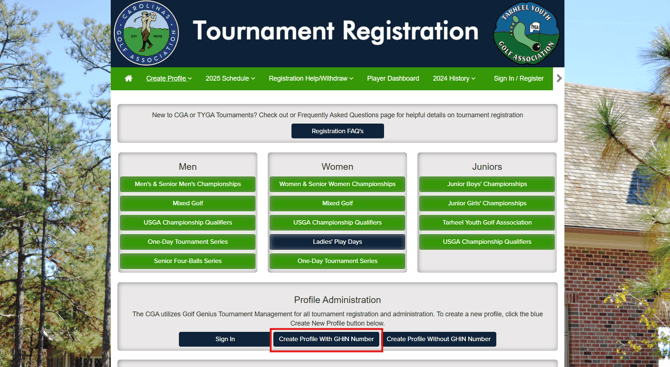
Visit cga.golfgenius.com and click "Create Profile With GHIN Number" under the Profile Administration section of the homepage.
**Note: If you do not have a GHIN Number, you will use the "Create Profile Without GHIN Number" option under the Profile Administration section.
Step 2:
Enter your GHIN number and Last Name and click the orange "Register" button.

Step 3:
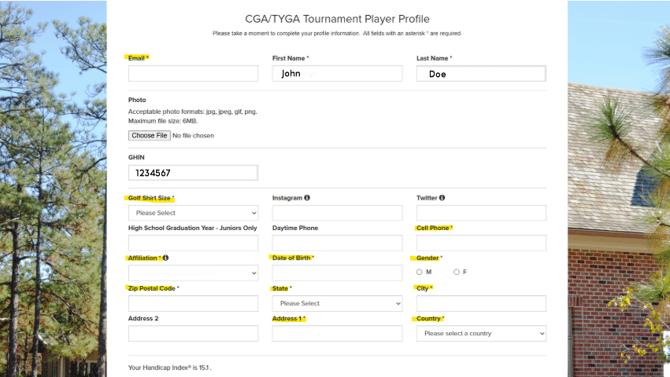
Enter the required information and click the green "Register" button in the bottom right corner.
** Note: If you enter your email and a Golf Genius profile already exists for you, you will need to enter your password for your Golf Genius account. If you do not know your password, you can click the "Forgot your Password?" button the page.
Step 4:
On the next page, check the two acknowledgement boxes and click the green "Next" button in the bottom right.

Once you are successfully registered, you should be taken back to the Tournament Registration homepage where you can view the Tournament Schedule and register for events.
If you have any questions, you can contact Member Services at 910-687-4040 or at gasc@carolinasgolf.org.