Skip to content
English
  • There are no suggestions because the search field is empty.

How do I post a score?

Posting scores on the GHIN App:

From your GHIN app home screen, click the red "POST SCORE" button:

Search/select the course you are playing:

Choose your scoring method (hole-by-hole and hole-by-hole with stats are recommended):


Complete your round setup (choosing number of holes played, tees, score type and date played) and click "Enter Hole-By-Hole Score":


Enter hole scores:


Once all hole scores have been filled in, click "Post Score":


Posting scores on the GHIN.com:

Click the red "Post Score" button on your GHIN homepage, or "Post Score" on the toolbar > select your scoring method > search/select your course:


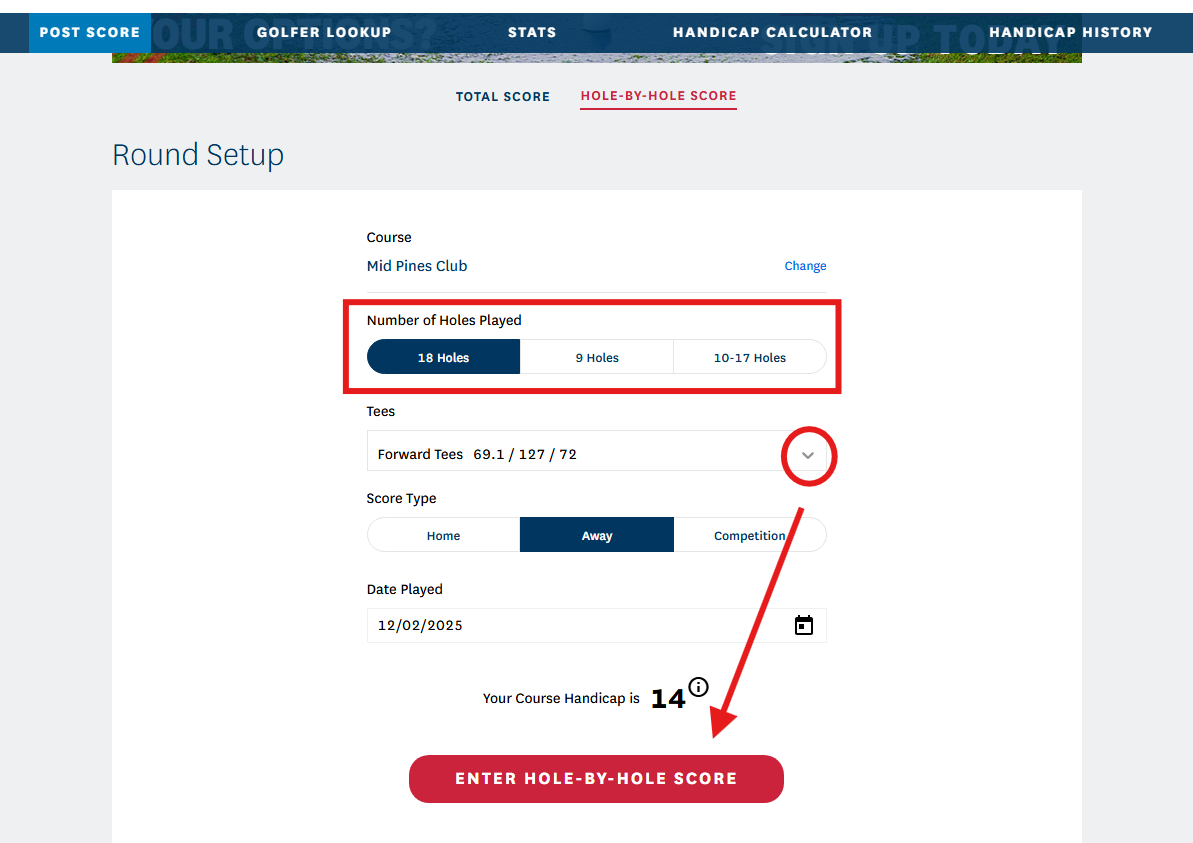
Complete your round setup (choosing number of holes played, tees and date played) and click "Enter Hole-By-Hole Score":

Enter hole scores. Once all scores have been entered, click "Post Score":